This page is intentionally not presented as a client success story. “examplebusiness.co.uk”, the score of 72 and every finding below are fictional. They show what the product looks like without inventing results, endorsements or performance claims.
The illustrative report at a glance
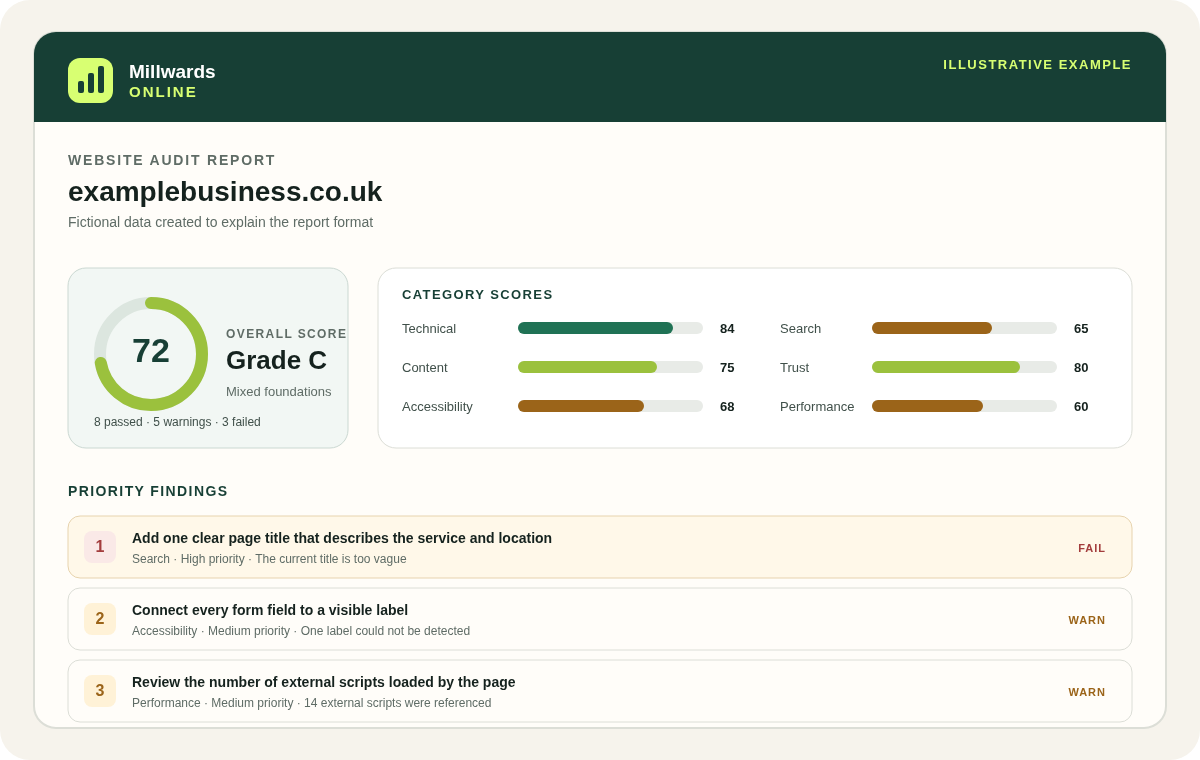
The example deliberately combines passes, warnings and failures. A perfect sample would hide how prioritisation works; an artificially poor one could make the service look alarmist. The middle score demonstrates how a report can acknowledge sound foundations while identifying specific issues.
1. The report summary
The top of a report identifies the final website address reached by the scanner and the time of the diagnostic. It then presents the overall score, grade and counts of passed, warning and failed checks.
In the real scoring model, a grade C covers 65–79. Grades are shorthand for coverage of the defined automated rule set; they are not a search-engine grade, quality certification or estimate of sales.
The report also records the final URL because redirects matter. If a submitted address lands on an unexpected host, an error page or a protection screen, the visible evidence may not describe the page the owner intended to audit.
2. Six category scores
Grouping results prevents a single number from hiding the nature of the work. A site can have strong technical delivery but weak search metadata, or good contact signals but incomplete form labels. The fictional example uses:
| Category | Example score | What contributes |
|---|---|---|
| Technical | 84 | HTTPS, status, redirects, headers, canonical and discovery files. |
| Search | 65 | Metadata, headings, indexability, structured data and sharing fields. |
| Content | 75 | Visible copy, image alternatives, internal links and enquiry paths. |
| Trust | 80 | Contact, privacy, About, social or map and location signals. |
| Accessibility | 68 | Viewport, language, labels, button names and skip link. |
| Performance | 60 | Fetch time, HTML size, lazy-loading declarations and script count. |
Each category is a weighted average of its applicable checks, not an equal count of coloured badges. The overall score is the weighted average across every rule. This keeps a foundational issue such as HTTPS or the page title more influential than a minor enhancement.
3. Findings, evidence and recommendations
A complete finding is designed to answer five practical questions:
- What was checked? A plain-language title names the detectable rule.
- What happened? Pass, warning or fail shows the rule outcome.
- What was detected? Evidence or a metric records the relevant returned signal.
- Why might it matter? An impact note explains the likely consequence without promising a result.
- What should be considered next? A recommendation gives a practical direction to verify and implement safely.
Fictional finding 1: page title
Status: fail · Severity: high. Detected evidence: the title was too vague to identify the service and location. Suggested direction: write one concise, page-specific title that accurately names the primary offer and context.
The recommendation would not tell the business to repeat keywords or copy a competitor. A useful title has to match the page visitors actually receive. The SEO audit guide explains why the working length range is only one part of the decision.
Fictional finding 2: form label
Status: warning · Severity: medium. Detected evidence: one input could not be connected to a label or accessible name. Suggested direction: identify the field, connect an accurate visible label and then test the form by keyboard and screen reader.
A corrected detectable label can improve the automated result, but it cannot prove that the whole form is accessible. Error recovery, focus order, instructions and announcements still need human testing, as explained in the accessibility audit guide.
Fictional finding 3: external scripts
Status: warning · Severity: medium. Detected metric: 14 external scripts were referenced in the HTML. Suggested direction: identify the purpose and cost of each script, remove unnecessary dependencies and validate changes with browser performance tools.
The count alone does not say which script is slow or whether all are unnecessary. It is an investigation prompt. The performance and technical guide explains why this is not a Lighthouse or Core Web Vitals result.
4. How the priority action plan is ordered
The automated plan takes up to eight non-passing checks. It sorts them first by severity—critical, high, medium and low—and then by rule weight. In the fictional example, the high-severity title issue appears before the two medium warnings.
This provides a consistent reading order, not a calculation of cost or commercial return. A technically lower-severity task might be a two-minute fix, while a high-priority issue may require platform access, stakeholder approval or a safe deployment window. Owners should consider effort, risk and business context before changing the site.
- 1VerifyConfirm the detected evidence matches the intended live page.
- 2PrioritiseCombine severity with effort, dependency and customer impact.
- 3Change safelyBack up, test and deploy through an appropriate process.
- 4RescanCheck whether the publicly detectable signal improved.
5. What is visible free and what the complete report adds
| Report element | Free snapshot | Complete report |
|---|---|---|
| Overall score and grade | Included | Included |
| Six category scores | Included | Included |
| HTTPS, title, description, contact route and viewport findings | Included | Included |
| All other finding titles and statuses | Locked counts | Included |
| Evidence, likely impact and recommendation | For public findings only | Included for every finding |
| Supporting metrics and prioritised automated action plan | Not included | Included |
The complete report costs £29 as a one-off purchase for that audit. The free response does not receive the premium details and blur them only with CSS; locked titles, evidence and recommendations remain server-side until authorised access is provided.
For repeated diagnostics, monthly monitoring schedules a fresh scan and supplies refreshed results. It does not turn the audit into continuous uptime, security or rank monitoring.
6. What even the complete report cannot claim
The complete version supplies more detail from the same automated scope. It does not turn one public-page scan into a whole-site crawl or expert certification. It does not inspect private pages, render every JavaScript state, measure Google rankings, test all WCAG criteria, perform a vulnerability scan or decide whether the business complies with law.
A report is a timestamped diagnostic. Websites, servers and third-party systems change, and automation can miss context or return a false positive. Read the full limitations, verify evidence and use appropriately qualified help where a decision is high impact.
Example report questions
Is the example based on a real client?
No. The domain, score, metrics and findings are fictional. The example demonstrates the report structure without publishing or implying a client result.
Will my report contain the same findings?
Not necessarily. A report is generated from the public response returned for the submitted website at scan time. Findings and scores depend on what is detected.
What is hidden in the free report?
The free result provides overall and category scores plus five public findings. Other finding titles, evidence, impacts, recommendations and supporting metrics remain locked until the complete report is purchased.