Start with a useful snapshot: enter a public website address on the audit form. Millwards Online follows a limited redirect path, reads the returned page and standard discovery files, and turns defined checks into an overall score, six category scores and plain-English observations.
A practical first-pass check, not a sales questionnaire
A small-business website can appear polished while still making basic information hard for customers or search systems to understand. A missing page title, weak contact route, insecure connection, unlabelled form field or unnecessarily heavy initial document can all be easy to overlook when you see the same site every day.
The free website audit is designed to expose those detectable foundations consistently. You supply the website address; a business name and service location are optional. The scanner does not ask how much you want to spend, require a sales call or hide the entire result behind an email form.
It is useful before a redesign, after a website update, when a site has not been reviewed for some time, or simply when you need an independent checklist. It can also help you ask a developer or marketing supplier more specific questions. The audit remains a diagnostic snapshot: it does not decide whether the whole website is commercially effective.
What the free website audit checks
The same underlying rule set is used for free and complete reports. The free view reveals a limited selection of useful findings while protecting the detailed premium evidence and recommendations. Checks are grouped into six categories:
- Technical healthHTTPS, response status, redirect length, selected security headers, canonical URL, robots.txt and XML sitemap discovery.
- Search foundationsPage title, meta description, one primary heading, heading order, indexability, structured data and Open Graph fields.
- Content signalsApproximate visible copy, image alternatives, internal links, a contact or enquiry path and optional business-name consistency.
- Customer trustContact details or forms, privacy and About links, recognised social or map profiles and location or postcode signals.
- Accessibility basicsMobile viewport, page language, detectable form labels, accessible button names and a keyboard skip link.
- Performance signalsServer-side fetch time, HTML size, declared image lazy loading and the number of external scripts referenced.
The full audit methodology publishes the rule thresholds and the exact boundaries of the scan. For a deeper explanation of individual categories, read the small-business SEO audit, accessibility audit and performance and technical audit guides.
What you receive from the free scan
The result opens in the browser after a successful scan. It includes the final website address reached, an overall score and grade, separate scores for all six categories, summary counts and five public findings: HTTPS, the search-result title, the search-result description, a clear contact route and the mobile viewport.
Other detected issues are represented by neutral locked cards and category counts. Their titles, evidence, impacts, recommendations and supporting metrics are not delivered in the free browser response. This is why the blurred details cannot simply be revealed with developer tools.
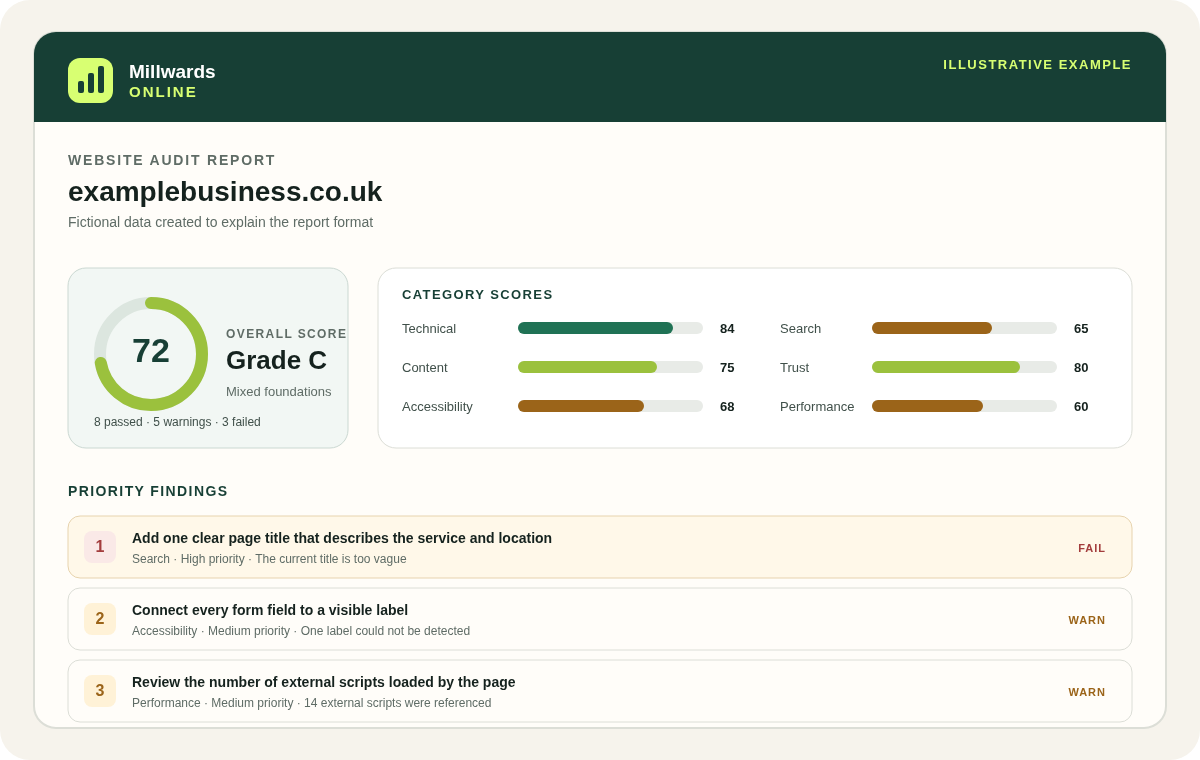
See the complete example report walkthrough to understand how category scores, evidence and the action plan fit together before you submit a website.
How the website score is calculated
Every rule earns a fraction from zero to one. A result at 0.95 or above is shown as a pass, 0.45 to 0.94 as a warning, and below 0.45 as a fail. Some checks are binary; range and ratio checks can receive partial credit.
Rules have weights from 1 to 8 so that foundational issues influence the result more than small enhancements. Each category score is the weighted average of its rules. The overall score is the weighted average across every applicable rule, rounded to a whole number.
A high number is not a Google score, accessibility certificate or guarantee of enquiries. It means the submitted response covered this particular rule set well at the time of the scan. The complete report orders up to eight non-passing checks first by severity and then by rule weight, giving you a consistent starting order rather than a claim about the commercial return of each fix.
What happens to the website address and your data
The scanner requests information that is already publicly accessible. It does not log in to the website, submit its forms or make changes. Private network addresses and unsuitable destinations are blocked, and requests have network, time, size and rate limits.
You can run the free audit without creating an account. The website address, optional business details, technical request information and generated result are processed to supply and protect the service. A free report is normally retained for up to 30 days. Payment information is only requested if you later choose a paid product, and Stripe—not Millwards Online—handles the full card details.
The privacy notice explains purposes, suppliers, retention and data-protection rights in full. Running an audit or buying a report is not treated as permission to send marketing.
What the free audit cannot prove
Automated checks have a defined boundary. The result is not a whole-site crawl, professional accessibility audit, security test, legal review, ranking report or guarantee of business performance.
The scanner primarily reads the submitted page as returned to a server-side parser. It does not behave like every browser, device, location or assistive technology. Content added only after JavaScript runs, interaction takes place or consent is granted may not be detected. Bot protection, personalisation and temporary server errors can also change the response.
Performance observations are limited to fetch time, HTML size and detectable document signals; they are not Lighthouse, Core Web Vitals or real-user measurements. Search checks cover on-page foundations, not Search Console coverage, live rankings, backlinks, reviews, Business Profile ownership or competitors. Accessibility checks cover a small set of structural signals and cannot establish WCAG conformance.
What happens after the scan
- Check the evidence. Confirm that the final address and visible details match what a normal customer sees.
- Use the free findings. You can act on those observations without buying anything.
- Go deeper if useful. The £29 complete report unlocks all findings, evidence, impact notes, recommendations and the prioritised automated action plan for that audit.
- Track future changes. The £15 monthly online-presence monitoring plan rescans one domain and provides refreshed results and change alerts.
- Retest after changes. A fresh scan can confirm whether the detectable signal has improved.
You remain free to implement fixes yourself or use any suitable supplier. If a finding points to a larger website project, Millwards Digital is available separately, but website design and hosting remain on millwards.shop so this site stays focused on audits and monitoring.
Free website audit questions
Is the website audit really free?
Yes. The free snapshot shows the overall and category scores plus a useful selection of findings. No account or payment card is required. The complete set of detailed findings is a separate paid report.
Do I need to give you access to my website?
No. The audit requests information that is already publicly available. It does not need a content-management-system login, submit forms or change the website.
Will the audit tell me how I rank on Google?
No. It checks detectable on-page search foundations such as the title, description, headings, canonical URL and structured data. It does not read Google rankings, Search Console, backlinks or competitor data.
What happens after the scan?
You can use the free findings, unlock the complete one-off report or choose monthly monitoring. You are not required to buy a report or use Millwards for implementation work.