Start with the response a public visitor can reach. The scanner follows a limited redirect route, records the final address, status, headers, time and HTML, and then applies separate technical and performance rules.
What this technical website audit can tell you
Before content can persuade anyone, the website has to reach a valid response. A long redirect chain can add delay and introduce avoidable points of failure. A failed status can prevent normal use. Conflicting canonical delivery can weaken clarity. A missing secure connection can damage trust.
The audit records those detectable foundations and pairs them with a few initial-document performance signals. That gives a small-business owner an understandable place to start without presenting one synthetic request as a complete account of every visitor’s experience.
Use the report after a domain migration, HTTPS change, hosting move, theme update or script installation. It can also help identify questions to take to a hosting provider or developer. It does not log into the server or content-management system, and it makes no changes.
Technical health checks included
- HTTPS connectionWhether the final audited address uses an encrypted HTTPS scheme.
- HTTP statusWhether the final response indicates successful public delivery rather than an error.
- Redirect pathHow many ordinary redirects were followed before reaching the final page, up to the request limit.
- Canonical addressWhether the returned HTML declares a preferred page URL.
- Security headersPresence of four selected browser response headers; presence alone does not prove a secure configuration.
- Robots.txt discoveryWhether the standard public crawler-instruction file can be found at the site root.
- XML sitemap discoveryWhether a standard root sitemap can be found; the complete file is not validated as a site crawl.
The fetcher applies network and size protections and rejects private or unsafe destinations. It can follow up to five ordinary redirects. The report records the final URL so you can spot when a submitted address unexpectedly lands on a different host, error route or generic holding page.
What the selected headers mean
Browser security headers can help limit particular classes of risk, but configuration quality matters. The automated rule only records whether four expected headers are present. It does not test every directive, browser behaviour or application endpoint. A passing result is therefore not a security assessment.
Performance signals included
- Server-side fetch timeUp to about 1.5 seconds passes; 1.5–3 seconds warns; above 3 seconds fails this rule.
- HTML document sizeUp to about 250 KB passes; 250–750 KB warns; a larger initial document fails this rule.
- Image lazy loadingMeasures the detectable proportion of images that declare lazy loading where present.
- External script countTen or fewer passes this count rule, 11–20 warns and more than 20 fails.
These thresholds make repeated scans consistent. They are useful indicators, not universal performance budgets. One essential script can be more expensive than several small scripts; an above-the-fold image may correctly load eagerly; and an HTML response can be compact while the rendered page still downloads large media or fonts.
The fetch time measures the audit server’s request to the submitted site at that moment. Hosting load, network route, cache state and protection systems can change it. A repeated warning deserves investigation with browser-based and real-user tools, but a single pass or fail should not be treated as the final answer.
What the report contains
The free snapshot shows separate technical and performance category scores. HTTPS is one of the five public findings, while other detailed observations are represented by locked counts. The complete report unlocks the status, evidence, impact note, recommendation, severity and supporting metric returned for every applicable rule.
Each rule receives a fraction from zero to one and a weight based on its importance in this diagnostic. HTTPS and response health carry stronger influence than lower-impact enhancements. Technical and performance scores are calculated separately, then contribute to the overall six-category result.
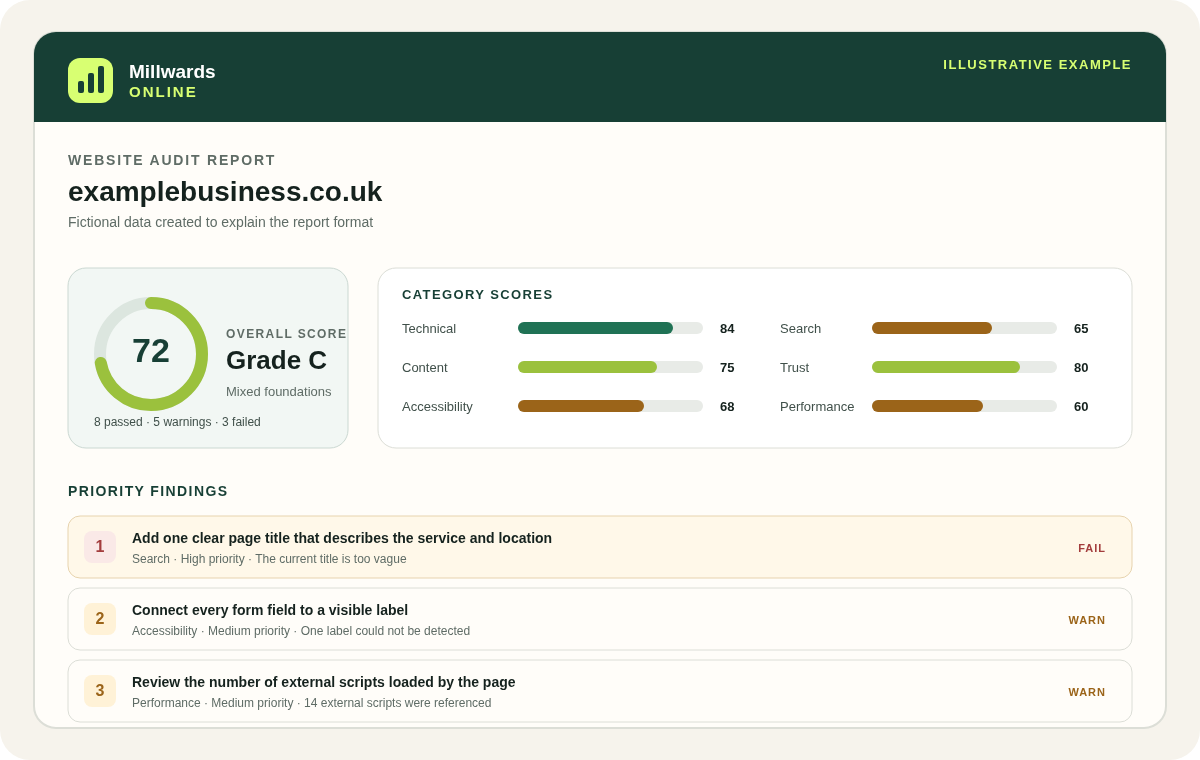
Read the example report walkthrough for the relationship between category scores and findings, or the methodology for the complete category definitions.
What this scan does not measure
The performance category is not a PageSpeed, Lighthouse or Core Web Vitals result. The technical category is not a security audit, uptime monitor or hosting certification.
- It does not run a full browser rendering trace or emulate a range of mobile devices and connection speeds.
- It does not use Chrome User Experience Report field data or measure real-user Largest Contentful Paint, Interaction to Next Paint or Cumulative Layout Shift.
- It does not identify every asset, render-blocking dependency, third-party cost, caching opportunity or JavaScript execution task.
- It does not perform penetration testing, malware scanning, dependency analysis or vulnerability discovery.
- It is not continuous uptime monitoring and does not request the website around the clock.
- It primarily assesses the submitted page, not every template, transaction or authenticated route.
What to do after a technical or performance finding
- Confirm the scanner reached the intended final URL and a normal page rather than a bot challenge or temporary response.
- Resolve failed delivery, insecure URLs and unnecessary redirect hops before polishing smaller performance signals.
- Check that internal links and the sitemap use the final canonical address directly.
- Review large HTML responses and script counts with the developer who understands the template and business requirements.
- Test representative pages with browser lab tools and, where available, real-user data before making performance claims.
- Back up the website and test infrastructure changes safely. Header, cache and redirect mistakes can make a site inaccessible.
- Run a fresh audit to confirm the publicly detectable response changed.
The monthly monitoring product can rescan the same authorised domain and show refreshed diagnostic results. It remains monthly website-audit monitoring rather than continuous availability or security surveillance.
Performance and technical audit questions
Is the performance score the same as PageSpeed Insights or Lighthouse?
No. Millwards Online records a server-side fetch time and detectable document signals. It does not run Lighthouse, measure Core Web Vitals or use real-user field data.
Does the technical audit test website security?
No. It observes HTTPS and four selected response headers, but it does not perform vulnerability scanning, penetration testing, malware detection or security certification.
Why can the same website receive a different fetch time later?
Network route, hosting load, cache state, protection systems and temporary availability can change a server-side request. Treat one timing as a snapshot and investigate repeated patterns with suitable performance tools.